With Manufacturer's Scan Tool
HOW TO READ AND ERASE DIAGNOSTIC TROUBLE CODESRequired Special Tool:
- MB991958: Scan Tool (MUT-III Sub Assembly)
- MB991824: Vehicles Communication Interface (V.C.I.)
- MB991827: MUT-III USB Cable
- MB991910: Main Harness A
CAUTION: To prevent damage to scan tool MB991958, always turn the
ignition switch to the "LOCK" (OFF) position before con-connecting or disconnecting scan tool MB991958
NOTE: If the battery voltage is low, diagnostic trouble codes will not be set. Check the battery if scan tool MB991958 does not display.
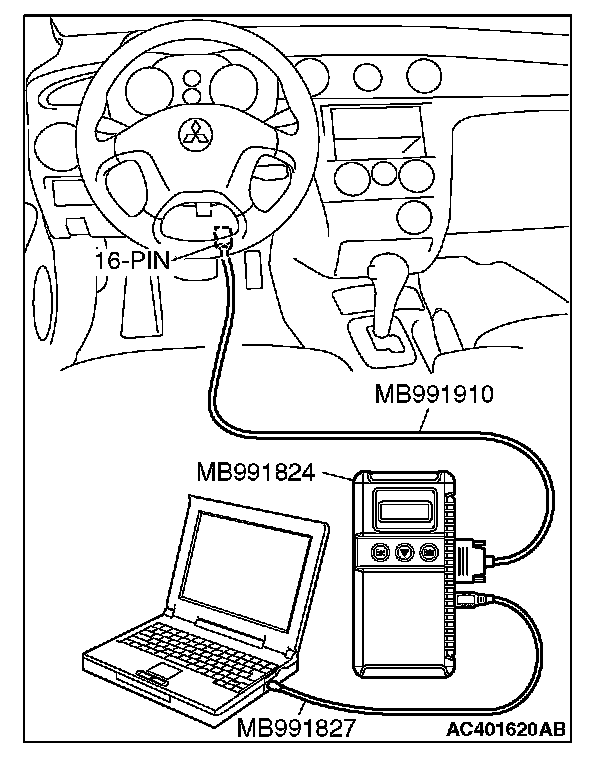
1. Connect scan tool MB991958 to the data link connector.
2. Turn the ignition switch to "ON" position.
3. Select "Interactive Diagnosis" from the start-up screen.
4. Select "System select."
5. Choose "IMMOBILIZER" from the "POWER TRAIN" tab.
6. Select "Self-diagnosis."
7. If a DTC is set, it is shown.
8. Choose "Erase DTCs" to erase the DTC.